In the previous post, I outlined the Home Dashboard touchscreen for controlling lights, temperature/humidity, displaying Amazon Echo information, displaying who's home (via bluetooth sniffing), and displaying what was being watched on DirecTv. As this dashboard is intended to be a sudo remote control for my home, I thought it made sense to be able to actually control the TV with it. 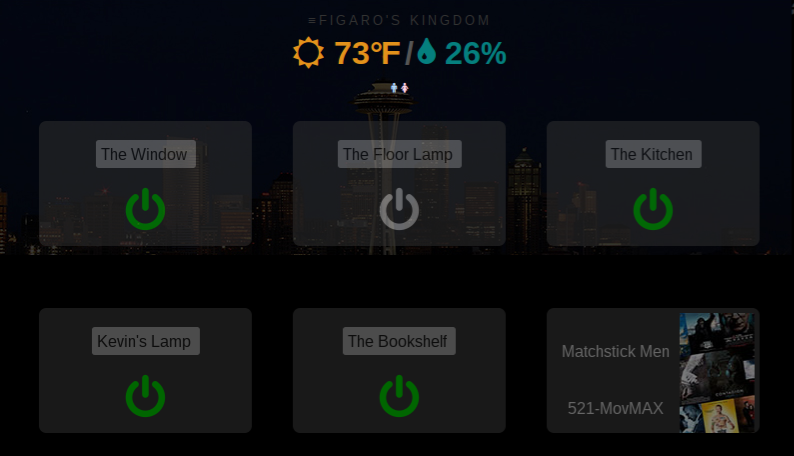
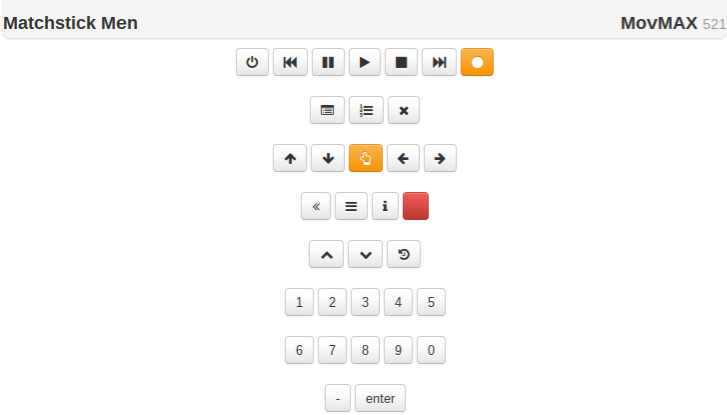 After a bit of tweaking and some UI work, the end result is a super-quick (HTTP response is ~30 milliseconds which feels nearly as quick as the standard DirecTv remote) interaction between device and DirecTv receiver. From my home dashboard/touchscreen controller, I can select the title that's currently playing to launch the remove control (pictured above). You'll notice that the touchscreen controller can do everything the standard remote can do, including guide browsing, DVR browsing, etc.
Expanding the Home Dashboard
Categories: Home Automation , Kiosk , Touchscreen Dashboard
Subscribe for more like this
Get an email when I publish the next post. No spam, just new writing.
1 Comment
Indexing my movie collection | Pi Fun · January 27, 2018 12:33 pm
Leave a comment